Pools & Experiments
Pools and experiments are the two core objects in qbrix. A pool defines what you're optimizing (the variants), and an experiment defines how (the algorithm).
Pools
A pool is a named collection of arms (variants). Think of it as a container for the options you want to optimize between.
Creating a Pool
pool = client.pool.create(
    name="checkout-buttons",
    arms=[
        {"name": "green-cta", "metadata": {"color": "#22c55e", "text": "Buy Now"}},
        {"name": "blue-cta", "metadata": {"color": "#3b82f6", "text": "Add to Cart"}},
        {"name": "orange-cta", "metadata": {"color": "#f97316", "text": "Get It Now"}},
    ],
)curl -X POST $QBRIX_URL/api/v1/pools \
-H "X-API-Key: $QBRIX_API_KEY" \
-H "Content-Type: application/json" \
-d '{
"name": "checkout-buttons",
"arms": [
{"name": "green-cta", "metadata": {"color": "#22c55e", "text": "Buy Now"}},
{"name": "blue-cta", "metadata": {"color": "#3b82f6", "text": "Add to Cart"}},
{"name": "orange-cta", "metadata": {"color": "#f97316", "text": "Get It Now"}}
]
}'Arms
Each arm in a pool has:
| Field | Type | Description |
|---|---|---|
name | string | Human-readable identifier |
index | int | Auto-assigned position (0-based), used internally for selection and feedback |
metadata | object | Arbitrary JSON — store anything your application needs to render the variant |
Arms are immutable after creation. To change the variant set, create a new pool. This prevents mid-experiment data corruption where historical feedback no longer maps to the correct arm.
Arm Metadata
Metadata is a free-form JSON object attached to each arm. qbrix doesn't interpret it — it's passed through to your application in selection responses.
Common patterns:
// visual variants
{"image": "hero-summer.png", "headline": "Summer Sale"}

// pricing experiments
{"price": 9.99, "currency": "USD", "discount_label": "20% off"}

// feature flags
{"show_reviews": true, "layout": "two-column"}

// model variants
{"model_id": "gpt-4o", "temperature": 0.7}
Pool Rules
- A pool must have at least 2 arms (otherwise there's nothing to optimize)
- Pool names must be unique within your workspace
- A pool can be used by multiple experiments simultaneously (e.g., same variants, different algorithms)
- Deleting a pool that has active experiments is not allowed — disable the experiments first
Experiments
An experiment links a pool to a policy — the algorithm that decides which arm to serve. It defines how arms are selected and how feedback updates the policy's parameters.
Creating an Experiment
experiment = client.experiment.create(
    name="checkout-optimization",
    pool_id=pool.id,
    policy="BetaTSPolicy",
    policy_params={"alpha_prior": 1.0, "beta_prior": 1.0},
)curl -X POST $QBRIX_URL/api/v1/experiments \
-H "X-API-Key: $QBRIX_API_KEY" \
-H "Content-Type: application/json" \
-d '{
"name": "checkout-optimization",
"pool_id": "<pool-id>",
"policy": "BetaTSPolicy",
"policy_params": {"alpha_prior": 1.0, "beta_prior": 1.0}
}'Experiment Fields
| Field | Type | Description |
|---|---|---|
name | string | Human-readable name |
pool_id | uuid | The pool this experiment operates on |
policy | string | Algorithm to use (see Policies) |
policy_params | object | Algorithm-specific configuration |
enabled | bool | Whether the experiment is active (default: true) |
Experiment Lifecycle
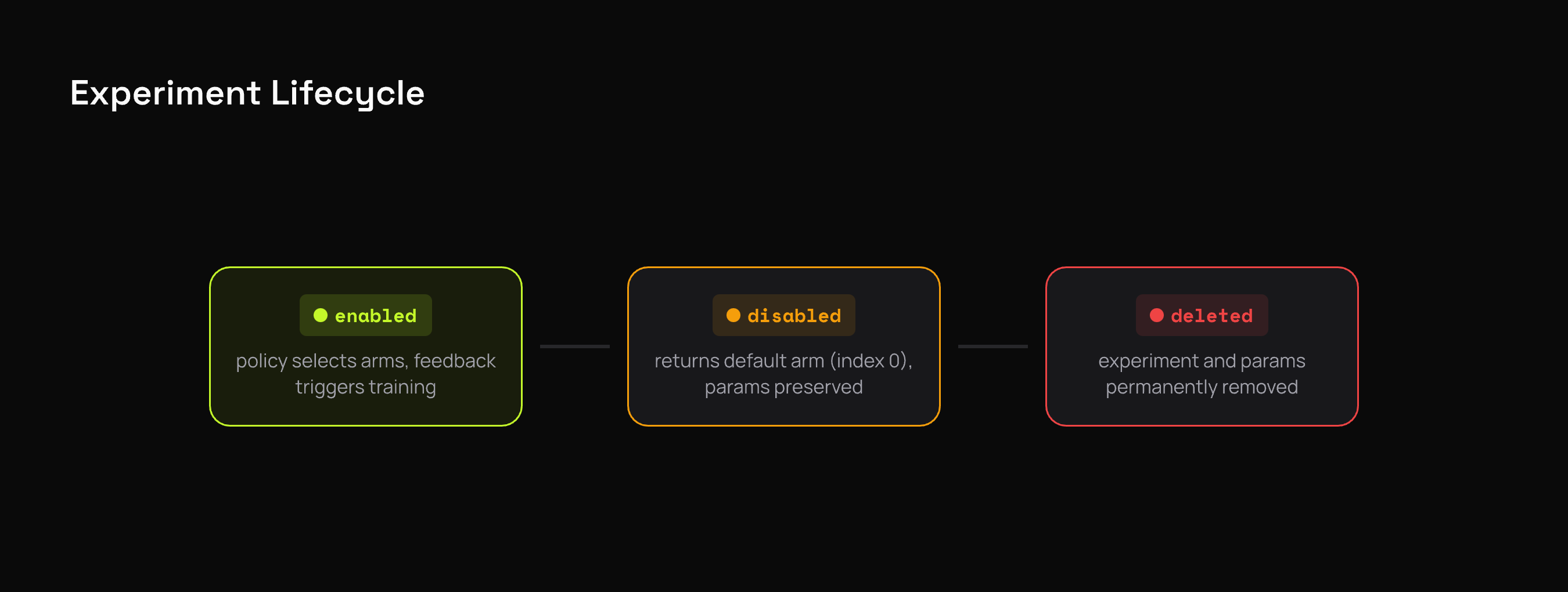
- Enabled: The experiment is live. Selections use the policy, feedback triggers training.
- Disabled: Selections fall back to the default arm (index 0). Useful for pausing an experiment without losing learned parameters.
- Deleted: The experiment and its learned parameters are permanently removed.
Policy Parameters
Each policy accepts different configuration. Parameters are set at experiment creation and can be updated later:
client.experiment.update(
    "<experiment-id>",
    policy_params={"alpha_prior": 2.0, "beta_prior": 1.0},
)curl -X PATCH $QBRIX_URL/api/v1/experiments/<experiment-id> \
-H "X-API-Key: $QBRIX_API_KEY" \
-H "Content-Type: application/json" \
-d '{"policy_params": {"alpha_prior": 2.0, "beta_prior": 1.0}}'Changing policy parameters resets the learned state. The experiment starts learning from scratch with the new configuration.
See Policies for the full parameter reference for every policy.
How Pools and Experiments Relate
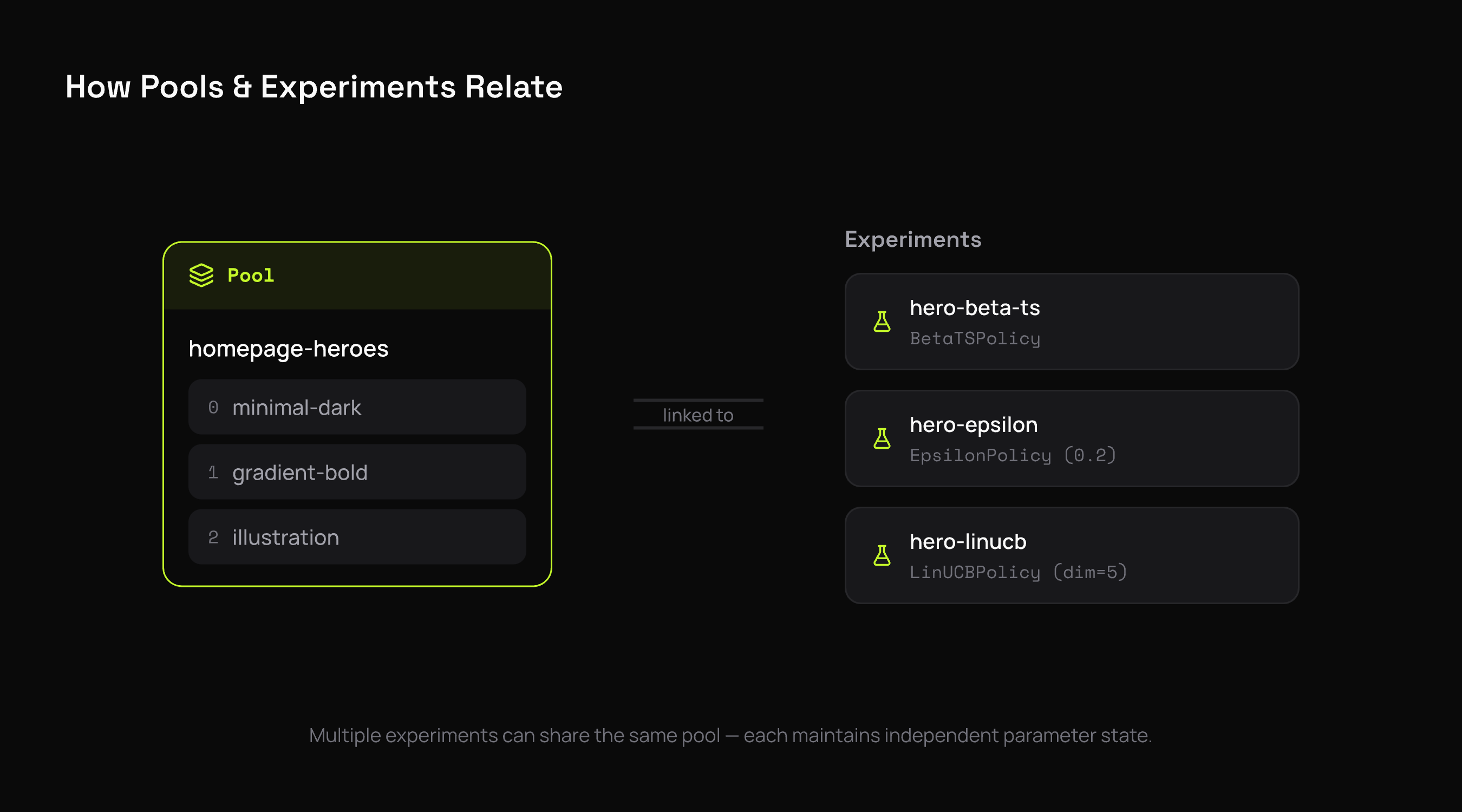
Multiple experiments can share the same pool. This is useful for:
- A/B testing algorithms — compare how different policies perform on the same variant set
- Segmented experiments — use feature gates to route different user segments to different experiments
Each experiment maintains its own independent parameter state. They don't interfere with each other.
What's Next
- Feedback & Rewards — how the learning loop works
- Contexts — add per-request features for personalized selection
- Policies — choose the right algorithm