
Feedback & Rewards
The feedback loop is how qbrix learns. After selecting an arm, you observe the outcome and send a reward signal back. The system uses these rewards to update the policy's parameters, making future selections better over time.
The Select-Feedback Loop
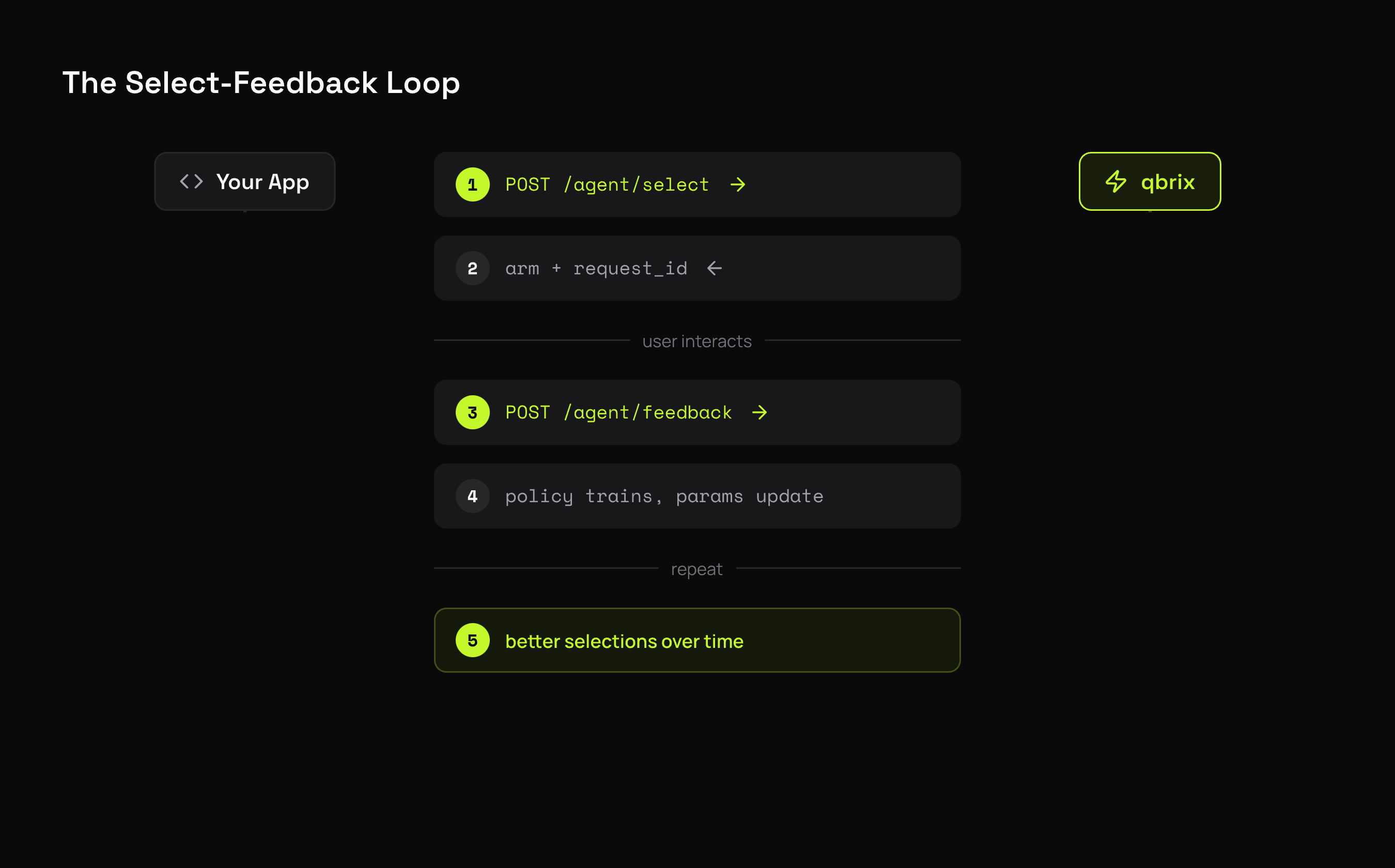
Each selection returns a request_id that links the selection to its feedback. This is how qbrix correlates which arm was shown with the reward it received.
Sending Feedback
result = client.agent.select(
    experiment_id="<experiment-id>",
    context={"id": "user-42"},
)

# ... user interacts with the selected variant ...

client.agent.feedback(
    request_id=result.request_id,
    reward=1.0,
)# select
RESP=$(curl -s -X POST $QBRIX_URL/api/v1/agent/select \
-H "X-API-Key: $QBRIX_API_KEY" \
-H "Content-Type: application/json" \
-d '{"experiment_id": "<experiment-id>"}')
REQ_ID=$(echo $RESP | jq -r .request_id)
# feedback
curl -X POST $QBRIX_URL/api/v1/agent/feedback \
-H "X-API-Key: $QBRIX_API_KEY" \
-H "Content-Type: application/json" \
-d '{
"request_id": "'"$REQ_ID"'",
"reward": 1.0
}'Reward Types
The reward value you send depends on which policy you're using:
Binary Rewards (0 or 1)
Used by: BetaTSPolicy, KLUCBPolicy
# user clicked → reward 1
client.agent.feedback(request_id=req_id, reward=1.0)

# user didn't click → reward 0
client.agent.feedback(request_id=req_id, reward=0.0)
Best for click-through rates, conversions, sign-ups — any yes/no outcome.
Continuous Rewards (any float)
Used by: GaussianTSPolicy, UCB1TunedPolicy, LinUCBPolicy, LinTSPolicy, MOSSPolicy, MOSSAnyTimePolicy
# revenue generated
client.agent.feedback(request_id=req_id, reward=49.99)

# time on page (seconds)
client.agent.feedback(request_id=req_id, reward=127.5)

# engagement score (0-100)
client.agent.feedback(request_id=req_id, reward=73.2)
Best for revenue, engagement time, scores — any numeric outcome.
Bounded Rewards
Used by: EXP3Policy, FPLPolicy (adversarial policies)
Rewards should be bounded (typically between 0 and 1). If your raw metric isn't bounded, normalize it:
# normalize revenue to [0, 1] range
max_revenue = 200.0
reward = min(actual_revenue / max_revenue, 1.0)
client.agent.feedback(request_id=req_id, reward=reward)
How Feedback Is Processed
Feedback is asynchronous. When you send a reward, it doesn't immediately update the policy — instead, it flows through a pipeline:
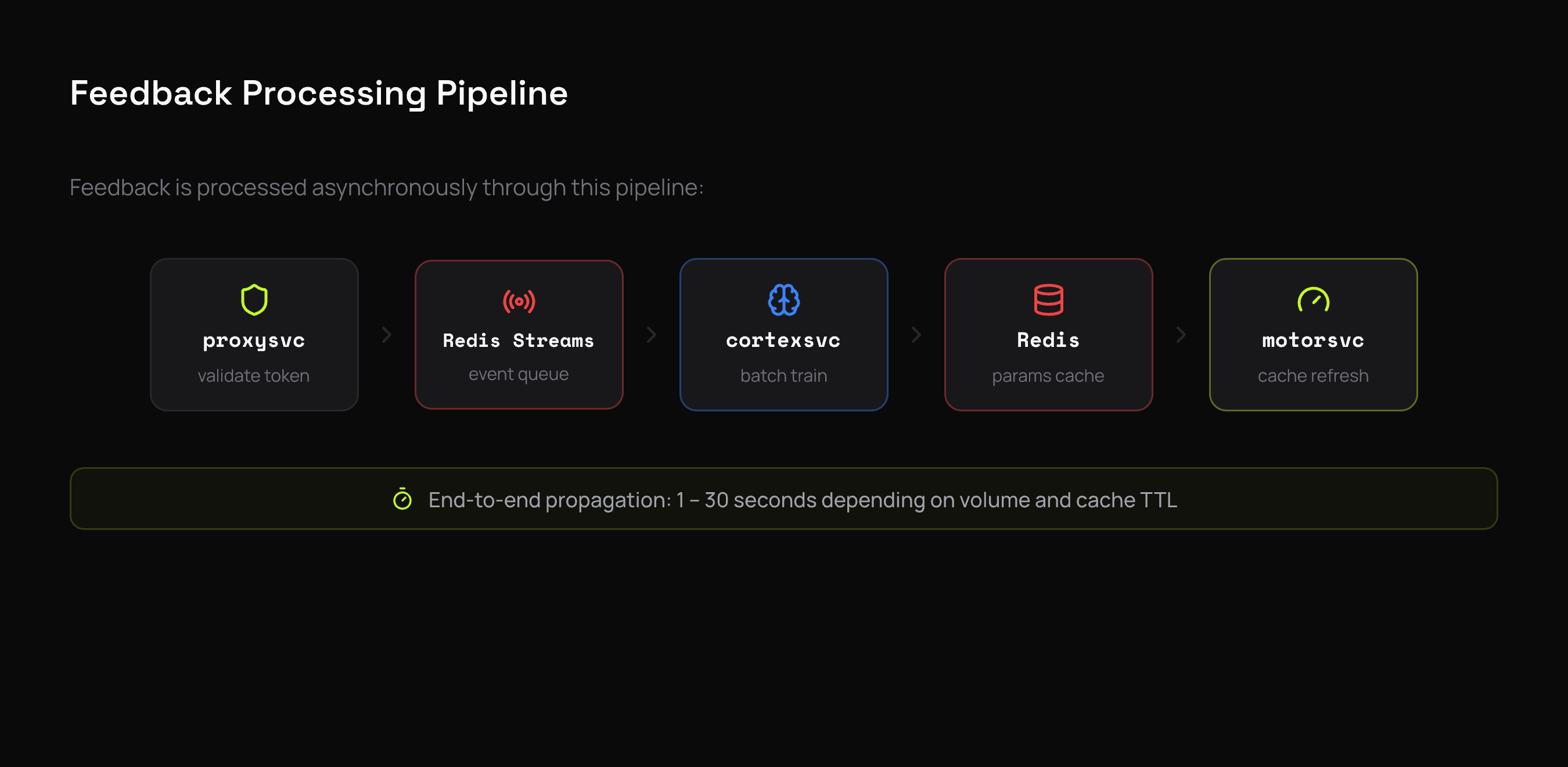
- proxysvc validates the request and the signed selection token
- The feedback event is published to Redis Streams
- cortexsvc consumes events in batches (default: 256 events or 100ms timeout)
- Events are dispatched to per-experiment worker queues
- Workers call
policy.train()with the batch - Updated parameters are written to Redis
- motorsvc picks up new params on next cache expiry (default: 60s)
End-to-end, parameter updates typically propagate within 30 seconds depending on feedback volume and cache TTL settings. This eventual consistency is by design — it keeps the selection hot path fast.
Selection Tokens
qbrix uses HMAC-signed selection tokens instead of server-side session state to correlate selections with feedback.
When you call /agent/select, the response includes a request_id that encodes:
- Tenant ID
- Experiment ID
- Selected arm index
- Context (ID, vector, metadata)
When feedback arrives, the token is verified and decoded. This means:
- No server-side state needed to track active selections
- No expiration — you can send feedback hours or days after selection
- Tamper-proof — the HMAC signature prevents modification
Feedback Timing
When to send feedback
Send feedback as soon as you observe the outcome. There's no strict time limit, but sooner is better for learning speed.
| Scenario | When to Send |
|---|---|
| Click-through | On click event (or after timeout for no-click) |
| Purchase | On checkout completion |
| Engagement | After session ends or at a defined checkpoint |
| Revenue | On transaction completion |
Missing feedback
Not every selection needs feedback. If a user abandons a session before you can observe an outcome, it's fine to skip feedback for that selection. The policy will still learn from the feedback it does receive.
If your feedback rate is very low (under 5%), the policy will learn slowly. Consider whether you can send partial or proxy rewards to increase the signal.
Delayed feedback
Feedback can arrive long after selection. Common in scenarios like:
- Email campaigns — user opens hours later
- Purchase funnels — conversion happens days after first impression
- Subscription trials — outcome known after trial period
The signed token doesn't expire, so delayed feedback works out of the box.
Best Practices
Use consistent reward scales
Pick a reward scale and stick with it for the duration of an experiment. Changing the scale mid-experiment (e.g., switching from 0/1 to 0-100) will confuse the policy.
Send negative signals too
For binary rewards, send reward=0.0 when the user doesn't convert — not just reward=1.0 when they do. Without negative signals, the policy can't distinguish between "this arm is bad" and "we haven't seen enough data for this arm."
Don't double-count
Send one feedback event per selection. If a user clicks a button multiple times, count it as one reward. Duplicate feedback inflates the perceived reward rate.
Match the policy to your reward type
Using a binary-reward policy (BetaTSPolicy) with continuous rewards, or vice versa, will produce poor results. See Policies for which reward types each policy expects.
What's Next
- Contexts — add per-request features for personalized selection
- Pools & Experiments — the data model
- API Reference — full endpoint documentation